Networking
XCP-ng is using Open vSwitch as its core, and supports various features from it.
Even if one NIC can be enough for your host, having a dedicated NIC for storage will be really important to get consistent performance (especially if you use shared storage like iSCSI or NFS).
XCP-ng hosts MUST NOT have a public IP address assigned to their management network. Management interfaces must only be accessible from trusted private networks.
This is even more important when using XOSTOR: see the related warning in the XOSTOR documentation.
Concepts
This section describes the general concepts of networking in XCP-ng. For a deeper dive, check the Network Architecture section.
XCP-ng creates a network for each physical NIC during installation. When you add a server to a pool, the default networks are merged. This is meant to be sure that all physical NICs with the same device name are attached to the same network, authorizing seamless VM flexibility on any host of the pool.
Typically, you add a network to create a new external network (bridge), set up a new VLAN using an existing NIC, or create a NIC bond.
You can configure four different types of networks in XCP-ng:
- Default Networks have an association with a physical network interface. Also called "External networks", they provide a bridge between a virtual machine and the physical network interface connected to the network. External networks enable a virtual machine to connect to resources available through the server’s physical NIC.
- Bonded networks create a bond between two or more NICs to create a single, high-performing channel between the virtual machine and the network.
- Private networks are used to connect VMs internally, without sending traffic outside the host
- Global Private Networks extend the single server private network concept to allow VMs on different pools and/or hosts to communicate with each other by using the XOA SDN controller.
Network objects
This section uses three types of server-side software objects to represent networking entities. These objects are:
-
A PIF, which is a way to connect outside of a host. PIF objects have:
- a name
- a description
- a UUID
- the parameters of the NIC they represent
- the network and server they are connected to
PIFs can represent:
- A physical NIC
- A VLAN on top of a physical NIC
- A bond of multiple NICs
- A tunnel interface (GRE/VXLAN)
-
A VIF, which represents a virtual NIC on a virtual machine. VIF objects have a name and description, a UUID, and the network and VM they are connected to. They can be:
- A PV driver backed device
- An emulated device
-
A network, which is a virtual Ethernet switch on a host. Network objects have a name and description, a UUID, and the collection of VIFs and PIFs connected to them.
xe CLI, Xen Orchestra or XO Lite allow you to configure networking options. You can control the NIC used for management operations, and create advanced networking features such as VLANs and NIC bonds.
Networks
Each XCP-ng server has one or more networks, which are virtual Ethernet switches. Networks that are not associated with a PIF are considered internal. Internal networks can be used to provide connectivity only between VMs on a given XCP-ng server, with no connection to the outside world. Networks associated with a PIF are considered external. External networks provide a bridge between VIFs and the PIF connected to the network, enabling connectivity to resources available through the PIF’s NIC.
MTUs
Definition
The Maximum Transmission Unit (MTU) represents the largest packet size, measured in bytes, that a network layer (such as Ethernet or TCP/IP) can transmit without fragmenting the data. It effectively sets the upper limit for the payload size of a single network packet.
Typical MTU values
In most Ethernet networks, the default MTU is 1500 bytes, though this value can differ depending on the infrastructure. For instance, high-performance environments often use Jumbo frames, which support MTU sizes up to 9000 bytes to reduce overhead and improve throughput. When a packet exceeds the MTU, it is split into smaller fragments, which can increase latency and processing overhead.
MTUs and virtualized environments
In virtualized environments like XCP-ng, maintaining consistent MTU settings across physical and virtual network interfaces is critical. Mismatched MTU values can lead to connectivity problems or degraded performance, particularly in storage or high-bandwidth scenarios.
For example, if a virtual machine (VM) in XCP-ng communicates over a network with a non-standard MTU, administrators should ensure the VM’s network interface MTU aligns with the physical network’s configuration to prevent packet loss or inefficiencies.
Support in XCP-ng
Non-standard MTUs (such as jumbo frames) are not supported on management interfaces. Using them can lead to serious issues, including failed pool member joins or unexpected network outages.
Non-standard MTUs are supported on storage interfaces. However, jumbo frames are unnecessary for most modern workloads, and can introduce more issues than benefits. Use them with caution.
While these limitations may be addressed in future updates, stick to default MTU settings on management interfaces to ensure operational stability.
VLANs
VLANs, as defined by the IEEE 802.1Q standard, allow a single physical network to support multiple logical networks. XCP-ng hosts support VLANs in multiple ways.
VLANs for VMs
Switch ports configured as 802.1Q VLAN trunk ports can be used with XCP-ng VLAN features to connect guest virtual network interfaces (VIFs) to specific VLANs. In this case, XCP-ng server performs the VLAN tagging/untagging functions for the guest, which is unaware of any VLAN configuration.
XCP-ng VLANs are represented by additional PIF objects representing VLAN interfaces corresponding to a specified VLAN tag. You can connect XCP-ng networks to the PIF representing the physical NIC to see all traffic on the NIC. Alternatively, connect networks to a PIF representing a VLAN to see only the traffic with the specified VLAN tag. You can also connect a network such that it only sees the native VLAN traffic, by attaching it to VLAN 0.
To use VLANs for your network logical isolation, it's really easy. You'll create a new network with a VLAN ID, and all virtual interfaces created on this network will transparently have traffic tagged in this VLAN. No need to configure anything inside your VM.
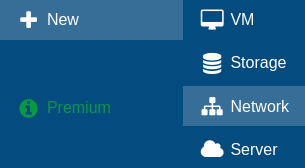
First step, go in Xen Orchestra menu, "New" then "Network":
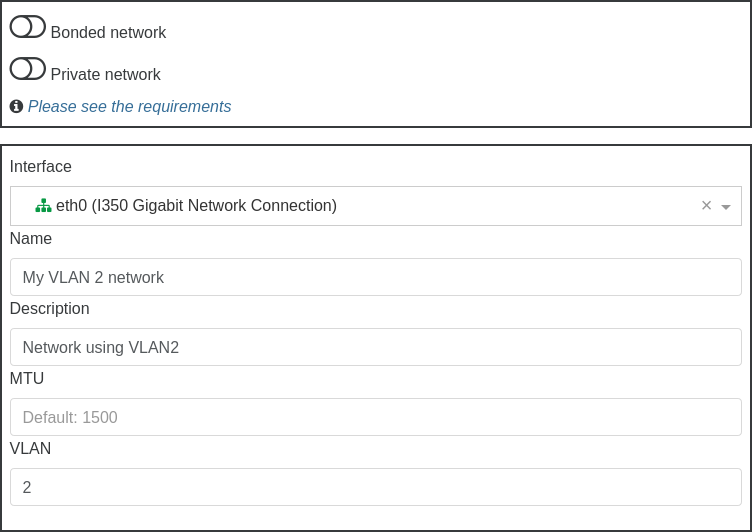
Then, select a pool where you want to create this network, and fill what's required, like physical interface selection, name and description and also VLAN number:
Finally, click on "Create network":

That's it!
When creating a VLAN-enabled network, setting its MTU higher than the underlying physical network can cause packets to be dropped by the OVS bridge. See MTU and VLAN interaction below for details.
Trunk link for VMs
It is also possible to directly expose the trunk link to the VM. The VIF should be configured to use the raw network (named by default "Pool-wide network associated with ethN"). It will get all the 802.1Q packets on the wire, and be able to send tagged packets for any VLAN.
In Xen Orchestra, such networks have their VLAN property set to None (as opposed to 0 for untagged ports and 1 to 4094 for tagged ports, where 802.1Q tagged packets are dropped).
Be careful with the link's MTU, since VLAN tagging adds a small overhead (4 bytes). Otherwise, packets may be fragmented or even dropped. It needs to be properly configured on the switch, within the XCP-ng network, and on the VM's network interface.
MTU and VLAN interaction
When you create a VLAN-enabled network in Xen Orchestra, it will share the same bridge as the underlying network.
If the VLAN-enabled network is configured with a higher MTU than the underlying network it rides on, packets sent from that VLAN will be dropped, not fragmented, as this is Layer 2 territory. The bridge cannot forward a frame that is larger than the egress port's MTU.
Example scenario:
| Interface | Role | MTU |
|---|---|---|
eth0 | Physical NIC, PIF for the main network | 1500 |
xapi0 | VLAN 11 over eth0, PIF for the VLAN network | 9000 |
vifX.Y | VM on the VLAN network | 9000 |
In this configuration, when a VM sends a 9000-byte packet on the VLAN, it arrives at the bridge and must exit through eth0 (MTU 1500). The bridge drops the packet because it exceeds the egress port's MTU.
Solution: Raise the physical interface's MTU to at least match the VLAN network's MTU before creating the VLAN network with jumbo frames.
Bonds
A bond aggregates 2 to 4 physical NICs into one logical interface, for redundancy (a cable, NIC or switch failure doesn't cut traffic) and, depending on the mode, more total bandwidth. Bonds work for VM traffic, management and storage alike, with or without VLANs on top.
Bond modes
- Active-active (
balance-slb, the default): all links carry traffic. VM traffic is spread by source MAC address and rebalanced periodically. No specific switch configuration needed, which makes it the easy and safe choice. One given VIF's traffic uses one link at a time, so a single VM won't exceed one NIC's bandwidth. - Active-passive (
active-backup): one link carries everything, the others are standby. No switch configuration either, and the most predictable failover behavior. Choose it when your switches don't support anything better or when you bond across two independent, non-stackable switches. - LACP (
lacp): the NICs form an 802.3ad link aggregation group with the switch, so the switch ports must be configured as an LACP LAG (and the switches stacked/MLAG if you spread the bond across two of them). Traffic can be hashed by source MAC or by IP and port, the latter letting a single VM use several links for multiple flows:
# xe bond-param-set uuid=<bond-uuid> properties:hashing_algorithm=tcpudp_ports
(src_mac is the other value.)
If you plan to install or upgrade a host whose management interface is on an LACP bond, read the LACP install guide first: the installer doesn't speak LACP.
Create a bond
From Xen Orchestra: New → Network, check "Bonded network", select the member PIFs and the mode. XO takes care of creating it properly on every host of the pool.
With xe, create a new network then the bond on each host, starting with the pool coordinator:
# xe network-create name-label="bond0"
# xe bond-create network-uuid=<network-uuid> pif-uuids=<pif1-uuid>,<pif2-uuid> mode=balance-slb
Notes:
- Do this from a NIC that is not part of the future bond (or from a serial/physical console): connectivity on the member NICs drops when the bond forms. If the management interface is among the members, XAPI moves it onto the bond automatically.
- The bond takes the MAC address of its first member; you can override it with
mac=at creation. - The failover reactivity is controlled by the bond's up delay (31000 ms by default, to avoid flapping):
xe pif-param-set uuid=<bond-pif-uuid> other-config:bond-updelay=<ms>then replug the PIF.
LACP bonds
Before creating an LACP bond on a pool, cable every host and configure its switch ports as an LACP LAG: Xen Orchestra creates the bond on all the hosts of the pool at once, and any host whose switch side isn't ready ends up without a working bond.
LACP rate. The host sends LACP PDUs every 30 seconds by default (slow). To send them every second, set the rate to fast and reboot the host:
# xe bond-list
# xe bond-param-set uuid=<bond-uuid> properties:lacp-time=fast
The rate only sets how often the host sends PDUs. It is not a link speed, and it doesn't need to match the switch setting: each side replies immediately to every PDU it receives.
Failover. When a link physically goes down (unplugged cable, failed port or NIC), LACP moves the traffic to the remaining links within milliseconds, whatever the rate. The rate only matters for failures where both ends keep their link up but traffic no longer flows, for example a fiber cut between two media converters: the link is declared dead after three missed PDUs, so 3 seconds with fast and 90 seconds with slow. If your hosts connect directly to the switches, the default rate is fine. For the fastest failover, set both the host and the switch to fast.
Monitoring. From the host:
# ovs-appctl lacp/show      # LACP negotiation, actor and partner state of each member
# ovs-appctl bond/show      # bond mode, active members and load per hash (works for every bond mode)
# ovs-vsctl list port bond0 # bond settings as applied in Open vSwitch
A healthy LACP bond shows lacp_status: negotiated, and each member is collecting and distributing.
The blog post Network bonds in XCP-ng walks through a complete LACP setup with example outputs.
Remove a bond
# xe bond-destroy uuid=<bond-uuid>
The member NICs come back as individual PIFs. If the management interface was on the bond, it moves back to the primary member.
Dedicated storage NIC
To keep storage (or backup) traffic away from the management and VM networks, give a spare NIC its own IP and use that subnet for your NFS/iSCSI targets:
# xe pif-list host-name-label=<host> device=eth2       # find the PIF
# xe pif-reconfigure-ip uuid=<pif-uuid> mode=static IP=10.10.10.11 netmask=255.255.255.0
# xe pif-param-set uuid=<pif-uuid> disallow-unplug=true other-config:management_purpose="Storage"
From Xen Orchestra: host → Network tab, edit the PIF's IP configuration directly.
The host routes storage traffic through that NIC simply because the storage target's IP belongs to its subnet, so use a dedicated subnet (and ideally a dedicated VLAN) for storage. This also composes with multipathing, which uses several such NICs on separate paths.
Management interface
The management interface is the PIF carrying XAPI traffic (pool communication, Xen Orchestra connections, migrations by default...). A few operations around it:
Move it to another NIC (or bond, or VLAN)
# xe pif-list host-name-label=<host>                  # find the target PIF
# xe pif-reconfigure-ip uuid=<new-pif-uuid> mode=dhcp # the future management PIF needs an IP config
# xe host-management-reconfigure pif-uuid=<new-pif-uuid>
Do this from a console that won't be cut (physical, serial, or the current management NIC if it stays connected): your management sessions will reconnect to the new address.
Put it on a bond
For redundancy, the management interface can sit on a bond like any other network. The simplest way is to include the current management NIC in the bond: XAPI moves the management interface onto the bond automatically when it forms. With LACP, make sure the switch ports are configured first, otherwise the host loses its management connection, and read the LACP install guide before any reinstall or upgrade.
If the host is unreachable after the bond is created, connect to its physical or serial console and move the management interface to the bond by hand. The bond PIF is the one with device bond0 and VLAN -1:
# xe pif-list host-name-label=<host> device=bond0 VLAN=-1
# xe pif-reconfigure-ip uuid=<bond-pif-uuid> mode=static IP=<ip> netmask=<mask> gateway=<gw> DNS=<dns>
# xe host-management-reconfigure pif-uuid=<bond-pif-uuid>
Change its IP configuration
# xe pif-reconfigure-ip uuid=<mgmt-pif-uuid> mode=static IP=<ip> netmask=<mask> gateway=<gw> DNS=<dns>
# xe host-management-reconfigure pif-uuid=<mgmt-pif-uuid>
On the pool coordinator, members will reconnect automatically; if a member gets lost after a coordinator IP change, point it to the new address with xe pool-recover-slaves from the coordinator. If you locked yourself out entirely, use the emergency network reset.
Change the hostname
# xe host-set-hostname-live host-uuid=<host-uuid> host-name=<new-hostname>
DNS servers
DNS is part of the management PIF's IP configuration (DNS= in pif-reconfigure-ip above, comma-separated). For DNS search domains, see DNS search domains.
Limit a VM's network bandwidth (QoS)
An outgoing rate limit can be set per virtual interface:
# xe vif-param-set uuid=<vif-uuid> qos_algorithm_type=ratelimit qos_algorithm_params:kbps=10240
(here about 10 MB/s). Unplug/replug the VIF, or restart the VM, to apply. Remove it by setting qos_algorithm_type="". This limits what the VM can send; incoming traffic shaping is a job for your physical network.
Restrict what a VM can send (switch port locking)
By default, a VM can emit any traffic on its networks. You can lock a virtual interface down to its expected addresses (anti-spoofing), or block it entirely. Useful when you don't fully trust what runs inside the VMs, e.g. in hosting scenarios.
# Only allow this VIF to send from a given IP
# xe vif-param-set uuid=<vif-uuid> locking-mode=locked
# xe vif-param-set uuid=<vif-uuid> ipv4-allowed=192.0.2.10

# Block a VIF entirely
# xe vif-param-set uuid=<vif-uuid> locking-mode=disabled
A network-wide default can be set for all VIFs that stay in default mode: xe network-param-set uuid=<network-uuid> default-locking-mode=disabled (or unlocked). Changes on a running VM need a VIF replug or a VM restart. See the CLI reference for the full parameter list.
NBD backup network
Xen Orchestra's NBD-enabled backups read disk data over the NBD protocol (port 10809), on networks you have explicitly allowed. To dedicate a network (for example your storage or a backup network) to that traffic:
# xe network-param-add uuid=<network-uuid> param-name=purpose param-key=nbd
The network needs an IP on each host (a dedicated NIC works perfectly). See the backup page for the XO side.
Manage physical NICs
Add a new NIC
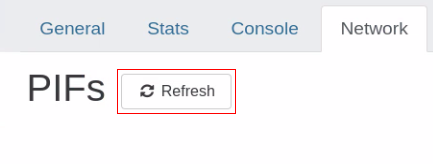
Once a NIC is physically installed, in Xen Orchestra, go to your host's networking tab and click refresh.
This can also be done on the command line. After physically installing a new NIC, you'll need to run an xe pif-scan command on the host to get this NIC added as an available PIF.
# xe pif-scan host-uuid=<HOST UUID>
Check new NIC by UUID:
# xe pif-list
Plug new NIC:
# xe pif-plug uuid=<NIC UUID>
Renaming NICs
In a pool, all NICs across your hosts should match up exactly. So if your management is NIC 0 and your 10Gbit storage interface is NIC 4 on host 1, it should be the same on host 2.
If for some reason the NIC order between hosts doesn't match up, you can fix it with the interface-rename command.
These commands are meant to be done on non-active interfaces. Typically this will be done directly after install, before even joining a pool.
# interface-rename --help
This will display all available options.
# interface-rename --list
This will display the current interface mapping/assignments.
Interfaces you wish to rename need to be downed first:
# ifconfig eth4 down
# ifconfig eth8 down
The most common use will be an update statement like the following:
# interface-rename --update eth4=00:24:81:80:19:63 eth8=00:24:81:7f:cf:8b
This example will set the mac-address for eth4 & eth8, switching them in the process.
The XAPI database needs the old PIFs removed. First list your PIFs for the affected NICs:
# xe pif-list
# xe pif-forget uuid=<uuid of eth4>
# xe pif-forget uuid=<uuid of eth8>
Reboot the host to apply these settings.
The interfaces by their new names need to be re-enabled:
# ifconfig eth4 up
# ifconfig eth8 up
The new interfaces need to be introduced to the PIF database:
# xe host-list
Make note of the host uuid. Then introduce the interfaces:
# xe pif-introduce device=eth4 host-uuid=<host uuid> mac=<mac>
# xe pif-introduce device=eth8 host-uuid=<host uuid> mac=<mac>
By renaming/updating interfaces like this, you can ensure all your hosts have the same interface order.
Remove a physical NIC
Before removing a physical NIC, ensure that no VMs are using the interface. Shut down the host, physically remove the NIC and boot. After boot, the PIF will need to be removed. You can do it this way:
# xe pif-forget uuid=<PIF UUID>
The <PIF UUID> can be obtained with either xe pif-list or with Xen Orchestra. This command only needs to be run once on the pool.
SDN controller
An SDN controller is provided by a Xen Orchestra plugin. Thanks to that, you can enjoy advanced network features.
GRE/VXLAN tunnels
Private networks (using tunnels) are very handy when you want to access resources in a secure manner, that are not in the same physical network.
So we want a network that is:
- reachable by all the hosts in a pool or even between different pools!
- unreachable by anything outside the network
- reactive when the pool changes (new host, host ejected,
PIFunplugged etc):
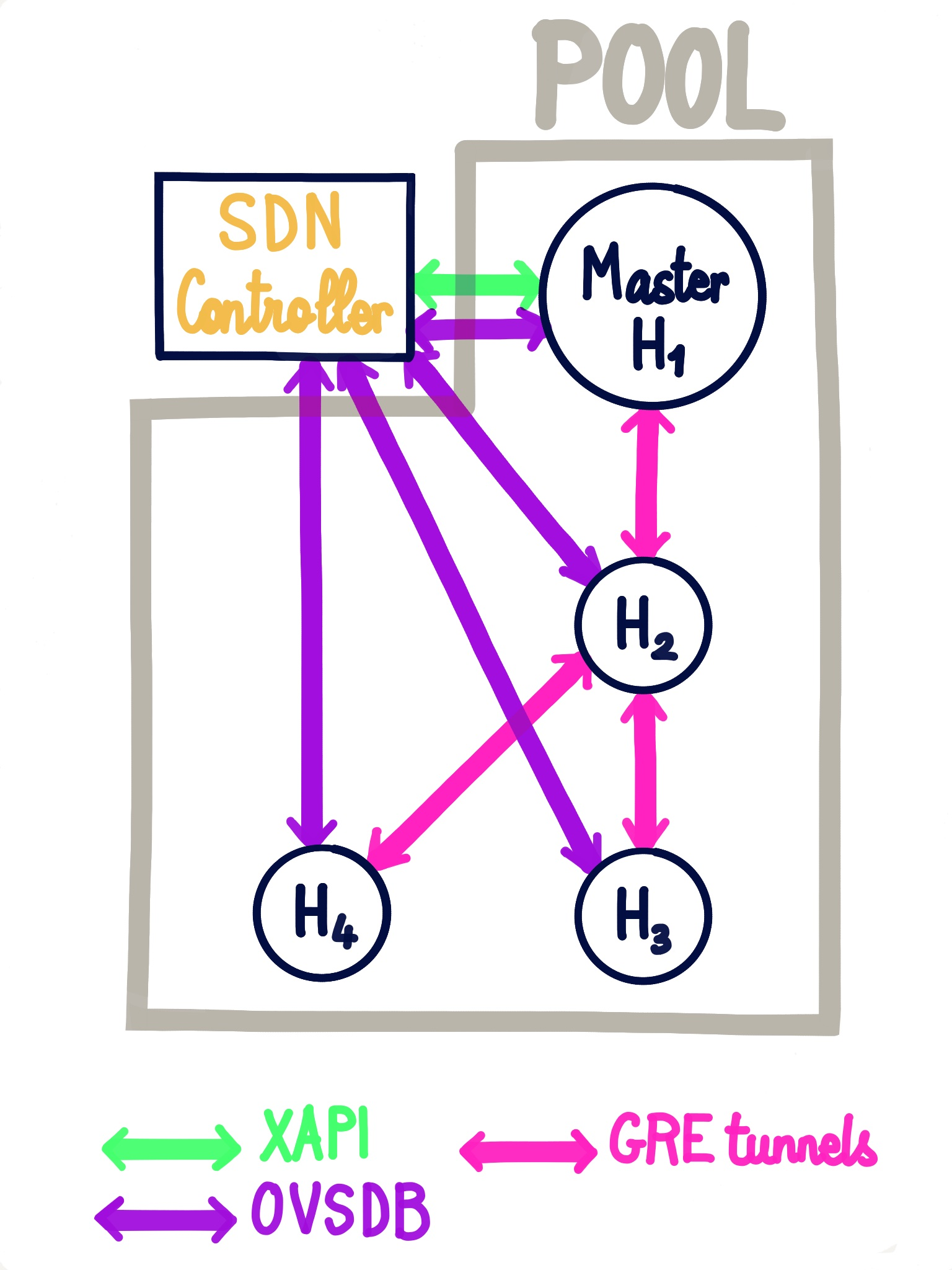
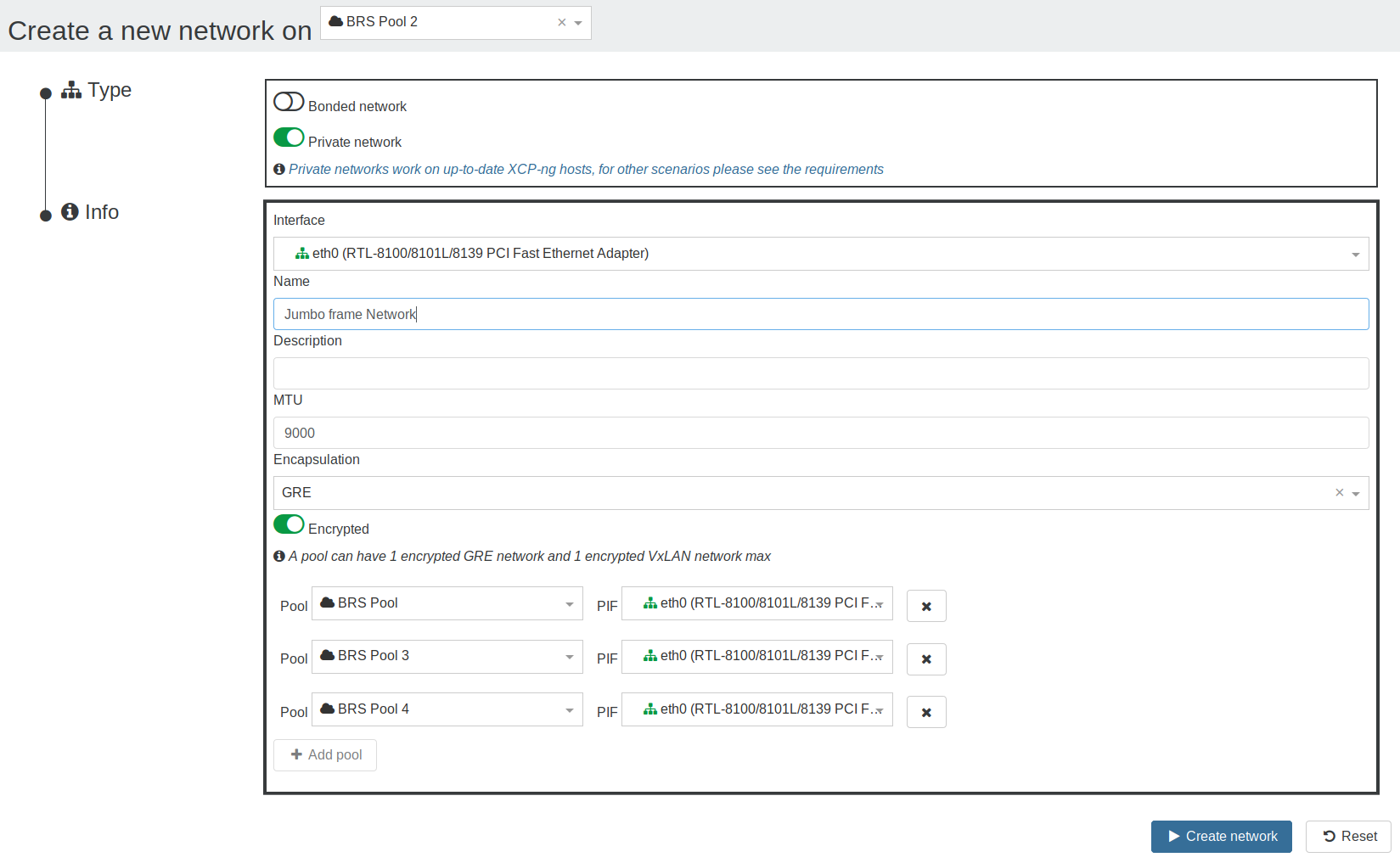
That's exactly what you can have thanks to XO SDN controller (here via GRE tunnels):
To create a private network, go in Xen Orchestra, New/Network and select "Private Network":
Encryption
To be able to encrypt the networks, openvswitch-ipsec package must be installed on all the hosts:
yum install openvswitch-ipsecsystemctl enable ipsecsystemctl enable openvswitch-ipsecsystemctl start ipsecsystemctl start openvswitch-ipsec
More information available on XO official documentation for SDN controller.
OpenFlow Rules
This section describes the new implementation (currently available in BETA). For the previous implementation, see the Xen Orchestra documentation.
- This is still in BETA. Do not use in production!
xcp-ng-xapi-plugins>= 0.15.0 is required. To check the version, runyum info xcp-ng-xapi-plugins.
Using Open vSwitch OpenFlow rules, you can set up traffic rules limiting some network accesses directly at the hypervisor vswitch level. No need for an additional layer of firewalling or filtering setup or equipment.
There are 2 ways to configure OpenFlow rules:
- Through Xen Orchestra's web UI (currently only available for per VIF rules)
- Using
xo-clias explained in the Xen Orchestra documentation
For debugging purposes, internals are documented in the sdncontroller.py plugin repository.
Common errors
TLS connection issue
The error would look like this:
Client network socket disconnected before secure TLS connection was established
It means the TLS certificate, used to identify an SDN controller, on the host doesn't match the one of the plugin, to solve it:
- unload the SDN Controller plugin
- in plugin config, set
override-certsoption to on (it will allow the plugin to uninstall the existing certificate before installing its own) - load the plugin
The issue should be fixed.
Static routes
Sometimes you need to add extra routes to an XCP-ng host. It can be done manually with an ip route add 10.88.0.0/14 via 10.88.113.193 (for example). But it won't persist after a reboot.
To properly create persistent static routes, first create your xen network interface as usual. If you already have this network created previously, just get its UUID with an xe network-list. You're looking for the interface you have a management IP on typically, something like xapi0 or xapi1 for example. If you're not sure which one it is, you can run ifconfig and find the interface name that has the IP address this static route traffic will be exiting. Then get that interface's UUID using the previous xe network-list command.
Now insert the UUID in the below example command. Also change the IPs to what you need, using the following format: <network>/<netmask>/<gateway IP>. For example, our previous ip route add 10.88.0.0/14 via 10.88.113.193 will be translated into:
# xe network-param-set uuid=<network UUID> other-config:static-routes=10.88.0.0/14/10.88.113.193
You must restart the toolstack on all hosts in the pool for the new route to be added!
You can check the result with a route -n afterwards to see if the route is now present. If you must add multiple static routes, it must be in one command, and the routes separated by commas. For example, to add both 10.88.0.0/14 via 10.88.113.193 and 10.0.0.0/24 via 192.168.1.1, you would use this:
# xe network-param-set uuid=<network UUID> other-config:static-routes=10.88.0.0/14/10.88.113.193,10.0.0.0/24/192.168.1.1
Removing static routes
To remove static routes you have added, stick the same network UUID from before in the below command:
# xe network-param-remove uuid=<network UUID> param-key=static-routes param-name=other-config
A toolstack restart is needed as before, on all hosts in the pool.
XAPI might not remove the already-installed route until the host is rebooted. If you need to remove it ASAP, you can use ip route del 10.88.0.0/14 via 10.88.113.193. Check that it's gone with route -n.
Full mesh network
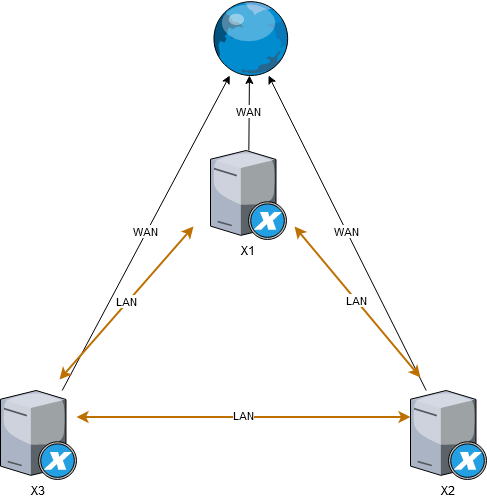
This page describes how to configure a three node meshed network (see Wikipedia) which is a very cheap approach to create a 3 node HA cluster, that can be used to host a Ceph cluster, or similar clustered solutions that require 3 nodes in order to operate with full high-availability.
Meshed network requires no physical network switches, the 3 physical nodes are interlinked with each other using multiple network interfaces.
Example with 3 nodes that each has 3 NIC, 1 is for WAN connection and 2 are used to interlink with remaining 2 nodes:
Right now only known-to-work option is to use bridge network backend, but hopefully in future it should be possible to setup meshed network using Open vSwitch as well (contributions welcome)
Using bridge backend
These steps will require reboot of all 3 nodes multiple times. They will also require you to use bridge network backend instead of Open vSwitch, which will result in loss of some functionality and is not commercially supported
Switch to bridge mode on all nodes
SSH to dom0
# on dom0 on each hypervisor as root user
xe-switch-network-backend bridge
# reboot the hypervisor
reboot
Create a bond on all nodes
Create a bond from Xen Orchestra or with xe bond-create (see Create a bond), selecting eth1 and eth2 as bond devices, leave all options as default
Reconfigure the bond device to broadcast mode
Again, ssh to dom0 on all nodes and execute
xe pif-list
# Example output
uuid ( RO)                  : f1580a37-6726-6479-d399-635e2cb719b6
                device ( RO): eth2
    currently-attached ( RO): false
                  VLAN ( RO): -1
          network-uuid ( RO): b33187c0-b231-0c69-6ee9-3ad2dcefa6f8


uuid ( RO)                  : 63abf866-890d-79bb-d276-8a50e8e4a94b
                device ( RO): eth0
    currently-attached ( RO): true
                  VLAN ( RO): -1
          network-uuid ( RO): 7404e9f7-7dfe-b666-d6f2-1fe9886498cd


uuid ( RO)                  : 77826c83-4b60-8137-c00f-3027d89b86b2
                device ( RO): eth1
    currently-attached ( RO): false
                  VLAN ( RO): -1
          network-uuid ( RO): ae9847e4-5587-2e61-4870-365143837aba


uuid ( RO)                  : 65380308-0c53-3d96-f564-06a724a792be
                device ( RO): bond0
    currently-attached ( RO): true
                  VLAN ( RO): -1
          network-uuid ( RO): b7e4d20b-64ed-bf38-c56f-4d740b579005

# Replace the UUID with the bond ID and execute following command
xe pif-param-set uuid=65380308-0c53-3d96-f564-06a724a792be other-config:bond-mode=broadcast
reboot
Configure the interface
Rename the bond network to something more memorable such as "MeshLAN" (from Xen Orchestra, or with xe network-param-set name-label=MeshLAN uuid=<network-uuid>), then add an IP to each dom0 on the bond PIF to test it out (from Xen Orchestra, or with xe pif-reconfigure-ip uuid=<bond-pif-uuid> mode=static IP=<ip> netmask=255.255.255.0), using the following addresses (you can use different addresses and range if you prefer to):
On each node respectively
- 192.168.10.1
- 192.168.10.2
- 192.168.10.3
Netmask: 255.255.255.0 Gateway: leave empty
Now SSH to each dom0 and try if you can ping all 3 IP addresses. If you can, you successfully created a meshed network. This network is going to provide interconnection between all 3 nodes and even if a node dies, connectivity between remaining 2 nodes will remain operational.
This setup will save you costs of 2 network switches you would otherwise have to purchase and use instead to achieve HA connectivity.
References
- Forum post: https://xcp-ng.org/forum/topic/1897/mesh-network
- Proxmox wiki: https://pve.proxmox.com/wiki/Full_Mesh_Network_for_Ceph_Server
DNS Search Domains
When XCP-ng is configured for static IP configuration there are no DNS search domains added. It is possible to add search domains into /etc/resolv.conf, however those won't persist across reboots. Use xe pif-param-set to add search domains that should persist across reboots.
- First identify the PIF used as management interface.
# xe pif-list host-name-label=xcpng-srv01 management=true
uuid ( RO)                  : 76608ca2-e099-9344-af36-5b63c0022913
              device ( RO): bond0
  currently-attached ( RO): true
                VLAN ( RO): -1
        network-uuid ( RO): cc966455-d5f8-0257-04a7-d3d7c671636b
- Take note of the
uuidfield and pass that toxe pif-param-set
# xe pif-param-set uuid=76608ca2-e099-9344-af36-5b63c0022913 other-config:domain=searchdomain1.com,searchdomain2.com,searchdomain3.com
This procedure has to be done for all hosts in the same pool.
Network Troubleshooting
Network corruption
Disabling TX offload might help to diagnose NIC issues:
# xe pif-param-set uuid=<PIF UUID> other-config:ethtool-tx=off
Disabling FCoE
If you are using bonds on FCoE capable devices, it's preferable to disable it entirely:
# systemctl stop fcoe
# systemctl stop xs-fcoe
# systemctl mask fcoe
# systemctl mask xs-fcoe
See https://github.com/xcp-ng/xcp/issues/138.
systemctl mask is similar to systemctl disable, but will also prevent the service from being re-enabled automatically by future XCP-ng maintenance updates. This change will however have to be done again after an upgrade to a newer release of XCP-ng.
Emergency Network Reset
Incorrect networking settings can cause loss of network connectivity. When there is no network connectivity, XCP-ng host can become inaccessible through Xen Orchestra or remote SSH. Emergency Network Reset provides a simple mechanism to recover and reset a host’s networking.
The Emergency network reset feature is available from the CLI using the xe-reset-networking command, and within the Network and Management Interface section of xsconsole.
Incorrect settings that cause a loss of network connectivity include renaming network interfaces, creating bonds or VLANs, or mistakes when changing the management interface. For example, typing the wrong IP address. You may also want to run this utility in the following scenarios:
- If a Pool master or host in a resource pool is unable to contact other hosts.
Use the xe-reset-networking utility only in an emergency because it deletes the configuration for all PIFs, bonds, VLANs, and tunnels associated with the host. Guest Networks and VIFs are preserved. As part of this utility, VMs are shut down forcefully. Before running this command, cleanly shut down the VMs where possible. Before you apply a reset, you can change the management interface and specify which IP configuration, DHCP, or Static can be used.
If the pool master requires a network reset, reset the network on the pool master first before applying a network reset on pool members. Apply the network reset on all remaining hosts in the pool to ensure that the pool’s networking configuration is homogeneous. Network homogeneity is an important factor for live migration.
- If the pool master’s IP address (the management interface) changes as a result of a network reset or xe host-management-reconfigure, apply the network reset command to other hosts in the pool. This is to ensure that the pool members can reconnect to the Pool Master on its new IP address. In this situation, the IP address of the Pool Master must be specified.
- Network reset is NOT supported when High Availability is enabled. To reset network configuration in this scenario, you must first manually disable high availability, and then run the network reset command.
Verifying the network reset
After you specify the configuration mode to be used after the network reset, xsconsole and the CLI display settings that will be applied after host reboot. It is a final chance to modify before applying the emergency network reset command. After restart, the new network configuration can be verified in Xen Orchestra and xsconsole. In Xen Orchestra, with the host selected, select the Networking tab to see the new network configuration. The Network and Management Interface section in xsconsole displays this information.
SR-IOV
To have SR-IOV enabled, you need:
- SR-IOV / ASPM compatible mainboard
- SR-IOV compatible CPU
- SR-IOV compatible network card
- SR-IOV compatible drivers for XCP-ng
You can't live migrate a VM with SR-IOV enabled. Use it only if you really need it!
Setup
- enable SR-IOV in your BIOS
- enable ASPM (seems to be needed according to https://www.juniper.net/documentation/en_US/contrail3.1/topics/concept/sriov-with-vrouter-vnc.html and https://www.supermicro.com/support/faqs/faq.cfm?faq=26448)
- enable SR-IOV in your network card firmware
Then, you can enable and configure it with xe CLI:
# xe network-create name-label=SRIOV
# xe network-sriov-create network-uuid=<network_uuid> pif-uuid=<physical_pif_uuid>
# xe network-sriov-param-list uuid=<SR-IOV Network_uuid>
The last command will tell you if you need to reboot or not.
Assign the SR-IOV network to your VM:
# xe vif-create device=<device index> mac=<vf_mac_address> network-uuid=<sriov_network> vm-uuid=<vm_uuid>
If you want to disable it:
# xe network-sriov-destroy uuid=<network_sriov_uuid>
Intel i218/i219 slow speed
With kernel version 4.15 a fix in the e1000e driver has been introduced. However, this fix slightly slows down DMA access times to prevent the NIC from hanging on heavy UDP traffic. This impacts the TCP performance. As a workaround to regain full transfer speeds, you can turn off TCP segmentation offloading via the following command:
# ethtool -K <interface> tso off gso off
There is currently no fix available / announced that allows offloading TCP segmentation to the NIC without sacrificing performance.
The following error message can be ignored: Cannot get device udp-fragmentation-offload settings: Operation not supported