Backup
It's really important to backup your VMs. You have multiple options, but only Xen Orchestra is both advanced, agentless, fully Open Source and officially supported (tested for all XCP-ng releases).
Xen Orchestra
Xen Orchestra is the most advanced backup solution and 100% integrated with XCP-ng. There are many different backup options:
- Automated rolling snapshots
- Full Backup
- Full Replication
- Incremental Backup
- Incremental Replication
- Mirror backup
- XO Metadata backup
- XCP-ng Metadata backup
- Cloud enabled XO Metadata backup
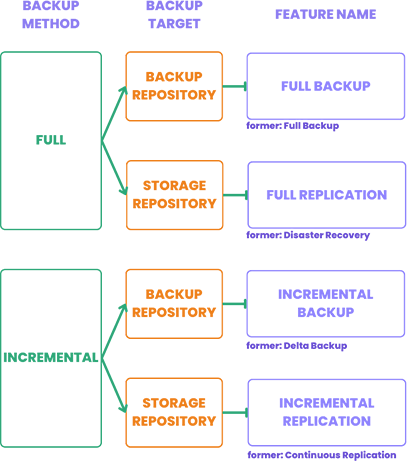
And they come with different features:
- NFS, SMB, S3 compatible backup repositories
- Encryption
- Compression
- File level restore
- NBD-enabled for extra backup speed (requires an NBD-enabled network)
- Rate limiting
- XO Proxy (backup remote sites without any VPN requirement)
All options are explained in the official documentation. Xen Orchestra is available as a turnkey virtual appliance, called XOA which you can deploy in a minute.
Alternatively, you can install and build it yourself from the GitHub repository.
3rd party solutions
There are 3rd party solutions officially compatible with XCP-ng to make VM backups. Please check our ecosystem page on the backup section.
Some popular backup solutions (like VEEAM) can be used with agents inside your VMs, while Xen Orchestra deals with VM backup.
However, you'll lose the tight integration you have between XCP-ng and Xen Orchestra, both part of the Vates Stack.
Disaster recovery
Disaster recovery (replicating VMs to a secondary site/pool and restarting them there when the primary is lost) is handled by Xen Orchestra: Continuous Replication keeps standby copies of your VMs on another pool's storage, ready to start; Disaster Recovery backup jobs do the same from backup files. See the XO backup documentation for the full picture (RPO, failover, failback).
What a DR plan needs on the XCP-ng side, whatever the tooling:
- Replicated VMs: continuous replication of the critical VMs to a pool that doesn't share the primary's failure domain (site, storage, power).
- Replicated configuration: pool metadata backup (below) and the XO config backup, restorable at the secondary site.
- Network mapping: know in advance which networks/VLANs the recovered VMs plug into at the secondary site.
- A management plane that survives: run Xen Orchestra (or be able to redeploy it from its config backup) outside the primary failure domain.
- Tests: a failover you never exercised is a hypothesis, not a plan. XO can start replicated VMs on an isolated network for testing.
Host and pool configuration backup
Besides VM data, the platform itself has state worth saving: the pool metadata (all your XAPI objects: VM configurations, SRs, networks...).
With Xen Orchestra (recommended)
Use an XCP-ng Metadata backup job in Xen Orchestra: it saves the pool metadata of the pools you select, on a schedule, to your backup repositories, with retention. Restoring it brings a reinstalled pool coordinator back to its full configuration. Details in the XO metadata backup documentation. While you're there, also enable the XO config backup so your Xen Orchestra setup itself (users, jobs, settings) is covered.
Manually
Under the hood this is the pool database, replicated on every pool member. You can dump and restore it yourself, for example before a risky manual operation:
# xe pool-dump-database file-name=pool-backup.db
To restore it on a freshly reinstalled pool coordinator:
# xe pool-restore-database file-name=pool-backup.db dry-run=true   # check first
# xe pool-restore-database file-name=pool-backup.db                # the coordinator restarts
Dump it before risky operations (upgrades already do it for you), and keep a copy off the pool.
Host configuration
xsconsole (menu Backup, Restore and Update) and the CLI can save a host's dom0 state:
# xe host-backup host=<host> file-name=host-backup.xbk
The result is big (it's a copy of the control domain's filesystem) and mostly useful right before hardware maintenance on the boot disk. In practice, a clean reinstall plus a pool metadata restore is often simpler and safer than a host restore; keep host-backup for specific cases.
What actually deserves a scheduled backup: your VMs (XO backup jobs), the pool metadata (XO's XCP-ng metadata backup), and your XO configuration itself (XO config backup). With those three, any host can be reinstalled from the ISO and everything else restored on top.